
Nano Banana 2.1 AI Image Generator
Google’s newest Flash image model, online in your browser. Create images from a prompt or edit your photos with words, in up to 4K, from 2 credits per image.
- Up to 4K
- 10 input images
- 14 aspect ratios
- No watermark
Nano Banana 2.1 AI image generator
Nano Banana 2.1 · 1K · PNG download
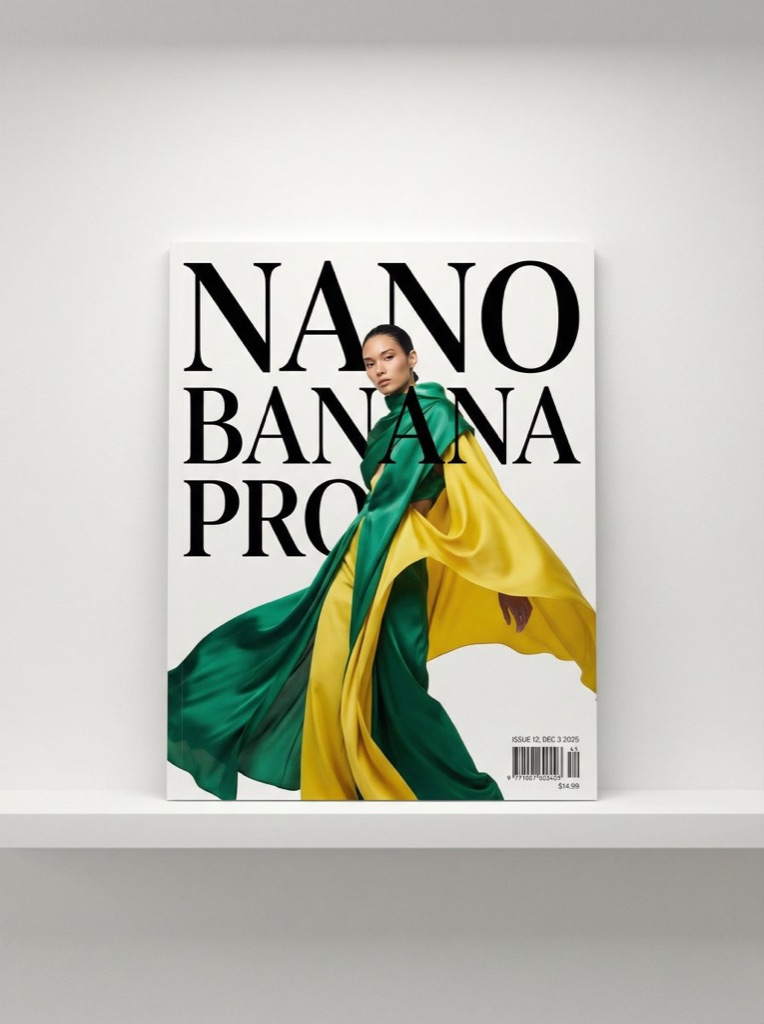 Example · Magazine cover with real type
- Nano Banana Pro
- Text to image
- 3:4
- 2K
Fashion magazine cover with the words Nano Banana Pro in large serif type and a model in green and yellow silk.
What is Nano Banana 2.1?
Nano Banana 2.1 is Google’s update to Nano Banana 2, released in October 2026. Google describes it as its latest high-efficiency model for image generation and conversational editing, built on Gemini 3.6 Flash.
It takes the same inputs as Nano Banana 2: a prompt of up to 20,000 characters, up to 10 images to edit or combine, 14 aspect ratios from 8:1 to 1:8, and 1K, 2K or 4K output. Here it also costs less than Nano Banana 2 at every size.
It is the default model in the generator on nano-banana.love. Use it straight from the browser, with no API key, app or Gemini account, and download PNGs without a visible watermark.
- Max output
- 4K
- Input images
- 10
- Aspect ratios
- 14
- Credits per image, from
- 2
Gemini 3.6 Flash by Google · not affiliated with Google
What you can make with Nano Banana 2.1
Click an image to load its prompt and settings into the generator, already set to Nano Banana 2.1.
Layered scenes from one prompt
A cat, a tablet showing the same cat, and that screen showing it again: Nano Banana 2.1 keeps track of what sits inside what, plus reflections, screens and background props, without a second try.
It knows what places look like
Name a country, a city or a dish and the right details appear on their own: the castle, the Alps and the timber houses of Bavaria here. Gemini’s world knowledge does the research for you.
Edits that keep the person
Turn a portrait into a crochet doll, a figurine or a painting and the face, hair and outfit still read as the same person. Add up to 10 images to combine people, products and styles in one edit.
Nano Banana 2.1 vs Nano Banana 2 vs Pro
Nano Banana 2.1 and 2 share inputs, sizes and shapes, and 2.1 costs less. Pro is the pick for heavy text and layouts.
| Model | Nano Banana 2.1 | Nano Banana 2 | Nano Banana Pro |
|---|---|---|---|
| Made by | |||
| Top size | 4K | 4K | 4K |
| Input images | Up to 10 | Up to 10 | Up to 8 |
| Aspect ratios | 14 | 14 | 10 |
| Download | PNG | PNG | PNG |
| Price at 1K | 2 credits | 3 credits | 5 credits |
| Price at 2K | 2 credits | 4 credits | 5 credits |
| Price at 4K | 3 credits | 5 credits | 7 credits |
| Best for | Everyday images and edits at a low price | Fast, sharp all-round images | Posters, covers and text in images |
Not sure which to pick? See all image models
How to use Nano Banana 2.1
- 01
Pick a mode
Text to Image starts from a prompt. Image Edit starts from your photos, up to 10 of them. Nano Banana 2.1 is already selected.
- 02
Describe it
Say what you want to see or change: subject, setting, light, style and any words that should appear in the image.
- 03
Choose the shape
Pick one of 14 aspect ratios, and 1K, 2K, 4K. The price is on the Generate button.
- 04
Generate and download
Most images are ready in under a minute. Download the PNG, or change the prompt and run it again.
Nano Banana 2.1 pricing
Pay per image. Credit packs start at $9.90 with no subscription, credits never expire, and failed images are refunded automatically.
| Model | 1K | 2K | 3K | 4K |
|---|---|---|---|---|
| Nano Banana 2.1 | 2 credits | 2 credits | — | 3 credits |
| Nano Banana 2 | 3 credits | 4 credits | — | 5 credits |
| Nano Banana Pro | 5 credits | 5 credits | — | 7 credits |
| Nano Banana 2 Lite | 2 credits | — | — | — |
| GPT Image 2.5 Sunburst | 2 credits | 3 credits | — | 5 credits |
| GPT Image 2.5 Flare | 2 credits | 3 credits | — | 5 credits |
| GPT Image 2 | 2 credits | 3 credits | — | 5 credits |
| Seedream 5.0 Pro | 2 credits | 4 credits | — | — |
| Seedream 5.0 Lite | — | 2 credits | 2 credits | 2 credits |
| Seedream 5.0 Flash | 1 credit | 1 credit | — | — |
| Grok Imagine Image 2.0 | 2 credits | — | — | — |
Nano Banana 2.1 FAQ
Something else? Email support@nano-banana.love.
What is Nano Banana 2.1?
Nano Banana 2.1 is Google’s update to Nano Banana 2, built on Gemini 3.6 Flash. It generates images from text and edits photos from plain-language instructions, with up to 10 input images and output up to 4K.
What is the difference between Nano Banana 2.1 and Nano Banana 2?
Nano Banana 2.1 is the newer model (Gemini 3.6 Flash against Gemini 3.1 Flash Image). Both take up to 10 images, the same 14 aspect ratios and 1K, 2K or 4K output. Here Nano Banana 2.1 costs 2 credits at 1K, 2 at 2K and 3 at 4K; Nano Banana 2 costs 3 credits at 1K, 4 at 2K and 5 at 4K. Try both on your own prompt before you switch.
When did Nano Banana 2.1 come out?
Google released Nano Banana 2.1 in October 2026, about eight months after Nano Banana 2. It is the default model in the generator on nano-banana.love.
Is Nano Banana 2.1 better than Nano Banana Pro?
For everyday images and edits, Nano Banana 2.1 is newer, faster and cheaper (2 credits at 1K, 2 at 2K and 3 at 4K against 5 credits at 1K, 5 at 2K and 7 at 4K) and takes more input images. For posters, covers and long text, Nano Banana Pro is still the safer choice.
Nano Banana 2.1 vs GPT Image 2.5: which should I use?
Nano Banana 2.1 is the better choice for photo edits that must keep a person recognisable, and costs from 2 credits. GPT Image 2.5 takes up to 16 input images and is strong at fine detail and long text. Both are in the same generator.
Is there a Nano Banana 2.1 API?
Google offers it to developers through the Gemini API. nano-banana.love has no public API: it is a web app where you use Nano Banana 2.1 without code or an API key.
Is Nano Banana 2.1 free?
No. Every image runs on Google’s model through a paid API, so generating costs credits: 2 credits at 1K, 2 at 2K and 3 at 4K. Packs start at $9.90 for 100 credits, enough for 50 Nano Banana 2.1 images, with no subscription. Credits never expire, and failed images are refunded automatically.
How do I use Nano Banana 2.1?
Open the generator at the top of this page, where Nano Banana 2.1 is already selected. Choose Text to Image or Image Edit, write a prompt (and upload photos for an edit), pick the aspect ratio and size, and press Generate. You sign in with Google; no API key or Google account needed.
Can I use Nano Banana 2.1 images commercially?
Yes. Images you generate are yours to use in ads, product listings, client work and social posts, as long as your prompt and uploads respect other people’s rights and follow our content standards. We add no visible watermark. Google’s invisible SynthID marker stays in the file.
Is nano-banana.love the official Nano Banana 2.1 website?
No. nano-banana.love is an independent website that runs Nano Banana 2.1 through a third-party API provider. It is not affiliated with or endorsed by Google. Your images stay in “My images” for 14 days.

Make your first Nano Banana 2.1 image
Describe it or upload a photo to edit, and download it in up to 4K.
Start creating