
GPT Image 2.6 AI Image Generator
OpenAI’s newest image model, in all three versions. Sunburst for detail and steady edits, Flare for speed, Economy for low-cost 1K images. Up to 4K, from 2 credits an image.
- Up to 4K
- 16 input images
- 15 aspect ratios
- Low, Medium, High quality
GPT Image 2.6 AI image generator
GPT Image 2.6 Sunburst · 1K · Medium · PNG download
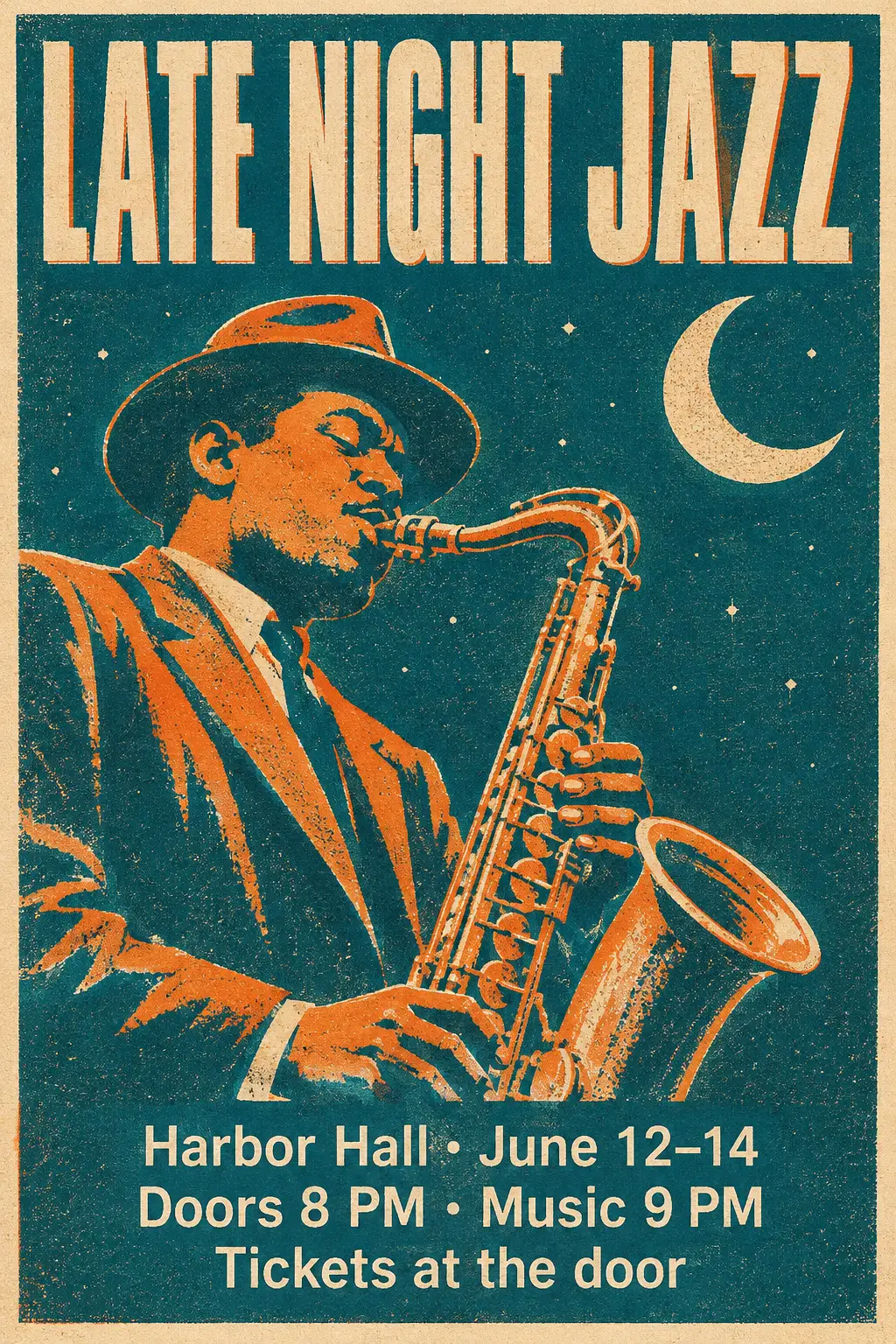 Example · Jazz festival poster
- GPT Image 2.6 Flare
- Text to image
- 2:3
- 1K
A screen-printed poster reading Late Night Jazz, with a saxophone player under a crescent moon in orange and teal.
What is GPT Image 2.6?
GPT Image 2.6 is OpenAI’s image generation and editing model after GPT Image 2.5. OpenAI announced it as Images 2.6 on November 4, 2026, for ChatGPT and for the API.
OpenAI ships GPT Image 2.6 as two API models. GPT Image 2.6 Flare is the fast one, and OpenAI says it lays out posters and product images better. GPT Image 2.6 Sunburst is built for detailed work and keeps images more consistent across edits. OpenAI says Images 2.6 makes images 50% faster than before.
GPT Image 2.6 Flare and Sunburst take a prompt of up to 32,000 characters and up to 16 images. They make 1K, 2K or 4K images in 15 aspect ratios, from 3:1 banners to 1:3 skyscrapers, at Low, Medium or High quality.
GPT Image 2.6 Economy is GPT Image 2.6 through a lower-cost channel of our API provider. GPT Image 2.6 Economy makes 1K images only, in 7 aspect ratios, for 2 credits an image. All three versions run in the browser with no OpenAI account, and GPT Image 2.5 is still in the same generator.
- Max output
- 4K
- Input images
- 16
- Aspect ratios
- 15
- Credits per image, from
- 2
GPT Image 2.6 by OpenAI · not affiliated with OpenAI
What you can make with GPT Image 2.6
Click an image to load its prompt and settings into the generator, already set to GPT Image 2.6.
Posters with every word in place
Put every word in quotes and say where it goes: headline, date, venue, small print. OpenAI says GPT Image 2.6 Flare lays out posters and product visuals better than before, and High quality gives small type the most detail.
Edits that stay consistent
Say what stays and what changes: here the face, beard and pose stay, and the shirt and the place change. GPT Image 2.6 Sunburst is the version OpenAI built for consistency across edits. Upload up to 16 images in one edit.
Wide banners and tall ads
Pick from 15 aspect ratios, including 3:1 website headers and 1:3 skyscraper ads, at up to 4K. Leave empty space for the words and GPT Image 2.6 sets them in it. Use Low quality for quick drafts and High for the final file.
GPT Image 2.6 vs GPT Image 2.5
GPT Image 2.6 adds a quality setting, more shapes and a cheap 1K Economy version. GPT Image 2.5 keeps one flat price per size.
| Model | GPT Image 2.6 Sunburst | GPT Image 2.6 Economy | GPT Image 2.5 Sunburst |
|---|---|---|---|
| Made by | OpenAI | OpenAI | OpenAI |
| Top size | 4K | One standard size | 4K |
| Input images | Up to 16 | Up to 16 | Up to 16 |
| Aspect ratios | 15 | 7 | 8 |
| Download | PNG | PNG | PNG |
| Price at 1K | 3 credits | 2 credits | 2 credits |
| Price at 2K | 5 credits | — | 3 credits |
| Price at 4K | 7 credits | — | 5 credits |
| Quality | Low, Medium, High | One setting | One setting |
| Image edit price | Adds credits per photo | Same as text to image | Same as text to image |
| Best for | Detailed work and consistent edits | GPT Image 2.6 drafts at 1K | Fine detail and long text, at 4K |
Not sure which to pick? See all image models
How to use GPT Image 2.6
- 01
Pick a mode
Text to Image starts from a prompt. Image Edit starts from your photos, up to 16 of them. GPT Image 2.6 Sunburst is already selected.
- 02
Describe it
Say what you want to see or change: subject, setting, light, style and any words that should appear in the image.
- 03
Choose the shape
Pick one of 15 aspect ratios, and 1K, 2K, 4K. The price is on the Generate button.
- 04
Generate and download
Most images are ready in under a minute. Download the PNG, or change the prompt and run it again.
GPT Image 2.6 pricing
Pay per image. Credit packs start at $4.90 with no subscription, credits never expire, and failed images are refunded automatically.
| Model | 1K | 2K | 3K | 4K |
|---|---|---|---|---|
| GPT Image 2.6 Sunburst | 3 credits | 5 credits | — | 7 credits |
| GPT Image 2.6 Flare | 3 credits | 5 credits | — | 7 credits |
| GPT Image 2.6 Economy | 2 credits | — | — | — |
| Nano Banana 2.1 | 2 credits | 2 credits | — | 3 credits |
| Nano Banana 2 | 3 credits | 4 credits | — | 5 credits |
| Nano Banana Pro | 5 credits | 5 credits | — | 7 credits |
| Nano Banana 2 Lite | 2 credits | — | — | — |
| GPT Image 2.5 Sunburst | 2 credits | 3 credits | — | 5 credits |
| GPT Image 2.5 Flare | 2 credits | 3 credits | — | 5 credits |
| GPT Image 2 | 2 credits | 3 credits | — | 5 credits |
| Seedream 5.5 | 1 credit | 2 credits | — | — |
| Seedream 5.0 Pro | 2 credits | 4 credits | — | — |
| Seedream 5.0 Lite | — | 2 credits | 2 credits | 2 credits |
| Seedream 5.0 Flash | 1 credit | 1 credit | — | — |
| Grok Imagine Image 2.0 | 2 credits | — | — | — |
GPT Image 2.6 Flare and Sunburst prices are for Medium quality. Low costs 2, 3 or 4 credits, and High costs 3, 6 or 9 credits, at 1K, 2K and 4K.
GPT Image 2.6 Flare and Sunburst edits cost more for each photo you upload at Medium quality: 3 credits at 1K, 5 at 2K or 8 at 4K with one photo, and up to 12, 14 or 17 with 16.
Seedream 5.5 edits cost more for each photo you upload: 2 credits at 1K or 3 at 2K with one photo, and up to 5 or 6 with 10.
GPT Image 2.6 FAQ
Something else? Email support@nano-banana.love.
What is GPT Image 2.6?
GPT Image 2.6 is OpenAI’s newest image generation and editing model, released on November 4, 2026. GPT Image 2.6 comes as Sunburst for detailed work and Flare for speed. Both make 1K, 2K or 4K images from text or from up to 16 input images.
Are ChatGPT Images 2.6 and GPT Image 2.6 the same?
Yes. OpenAI calls the release Images 2.6 in ChatGPT, and the API models are GPT Image 2.6 Sunburst and GPT Image 2.6 Flare. This site runs the API models, so you get GPT Image 2.6 without a ChatGPT subscription.
What is the difference between GPT Image 2.6 Sunburst and Flare?
GPT Image 2.6 Flare is the fast version, and OpenAI says Flare at Low quality can make an image in about six seconds. GPT Image 2.6 Sunburst is for detailed work and gives more consistent results across edits at Medium or High quality. Here both cost the same.
What is GPT Image 2.6 Economy?
GPT Image 2.6 Economy is GPT Image 2.6 through a lower-cost channel of our API provider. GPT Image 2.6 Economy makes 1K PNGs in 7 aspect ratios for 2 credits an image, with no quality setting. Use it for drafts and bulk images, and switch to Flare or Sunburst for 2K, 4K or High quality.
What does the GPT Image 2.6 quality setting change?
The quality setting decides how much detail GPT Image 2.6 Flare and Sunburst put into each image, and what it costs. Medium is the default, at 3 credits at 1K, 5 at 2K and 7 at 4K. Low costs 2, 3 or 4 credits, and High costs 3, 6 or 9 credits, at 1K, 2K and 4K. Use Low for drafts and High for small text and print.
What changed from GPT Image 2.5 to GPT Image 2.6?
OpenAI says GPT Image 2.6 makes images 50% faster, lays out posters better on Flare and keeps edits more consistent on Sunburst. On nano-banana.love, GPT Image 2.6 also adds Low, Medium and High quality and 15 aspect ratios, against 8 on GPT Image 2.5.
Can GPT Image 2.6 make GIFs or SVG files here?
No. OpenAI’s API can export animated GIFs and SVG files from GPT Image 2.6, but the generator on this site makes PNG images only. For a GIF or an SVG, use ChatGPT or the OpenAI API directly.
Is GPT Image 2.6 Sunburst free?
No. Every image runs on OpenAI’s model through a paid API, so generating costs credits: 3 credits at 1K, 5 at 2K and 7 at 4K. GPT Image 2.6 Flare and Sunburst prices are for Medium quality. Low costs 2, 3 or 4 credits, and High costs 3, 6 or 9 credits, at 1K, 2K and 4K. GPT Image 2.6 Flare and Sunburst edits cost more for each photo you upload at Medium quality: 3 credits at 1K, 5 at 2K or 8 at 4K with one photo, and up to 12, 14 or 17 with 16. Packs start at $4.90 for 40 credits, enough for 20 GPT Image 2.6 Sunburst images, with no subscription. Credits never expire, and failed images are refunded automatically.
How do I use GPT Image 2.6 Sunburst?
Open the generator at the top of this page, where GPT Image 2.6 Sunburst is already selected. Choose Text to Image or Image Edit, write a prompt (and upload photos for an edit), pick the aspect ratio, size and quality, and press Generate. You sign in with Google; no API key or OpenAI account needed.
Can I use GPT Image 2.6 Sunburst images commercially?
Yes. Images you generate are yours to use in ads, product listings, client work and social posts, as long as your prompt and uploads respect other people’s rights and follow our content standards. We add no visible watermark.
Is nano-banana.love the official GPT Image 2.6 Sunburst website?
No. nano-banana.love is an independent website that runs GPT Image 2.6 Sunburst through a third-party API provider. It is not affiliated with or endorsed by OpenAI. Your images stay in “My images” for 14 days.

Make your first GPT Image 2.6 image
Pick Sunburst, Flare or Economy, choose a quality, and download a PNG in up to 4K.
Start creating