
Seedream 5.5 AI Image Generator
ByteDance’s newest image model, online in your browser. Edit a photo without the rest of it changing, or get a transparent PNG straight from a prompt, from 1 credit an image.
- Up to 2K
- 10 input images
- Transparent PNG
- No watermark
Seedream 5.5 AI image generator
Seedream 5.5 · 1K · PNG download
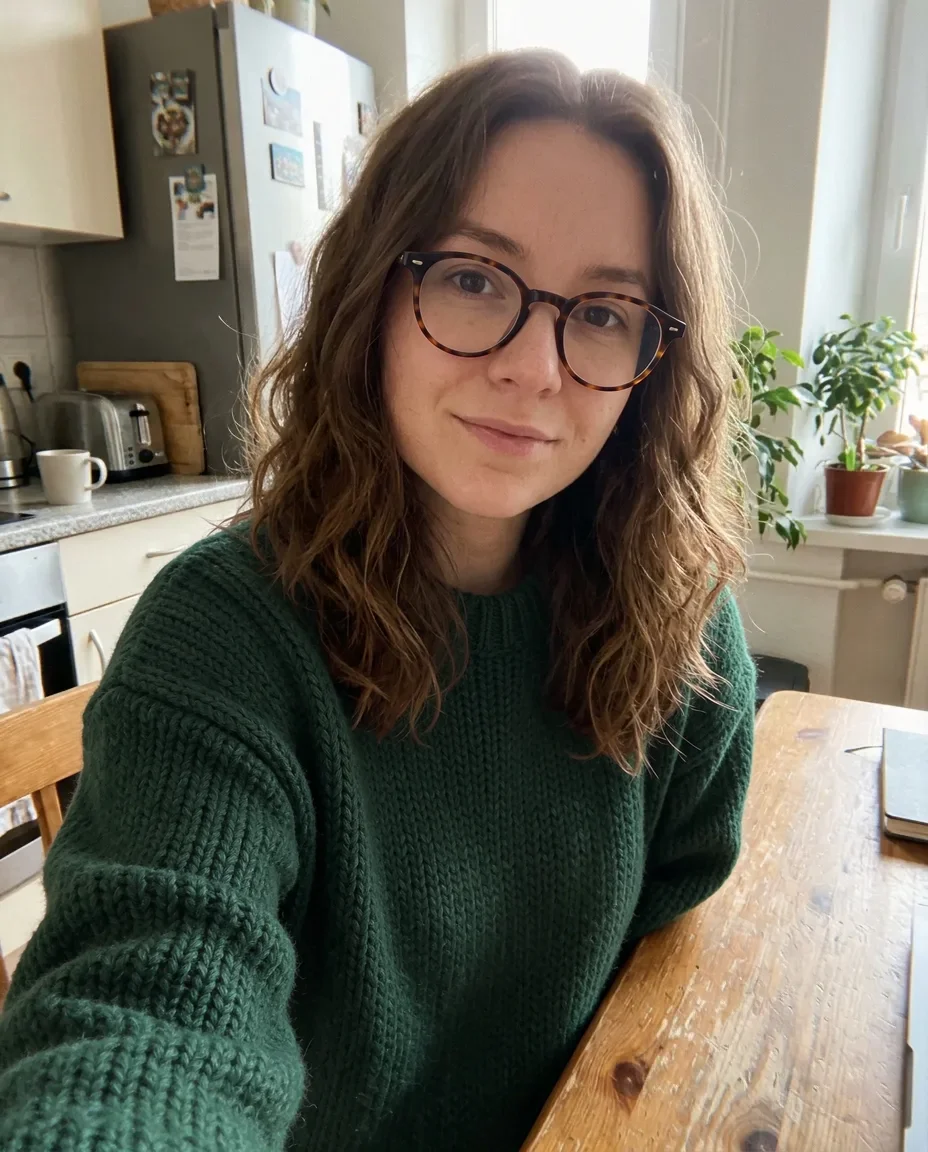 Example · New sweater and glasses, same photo
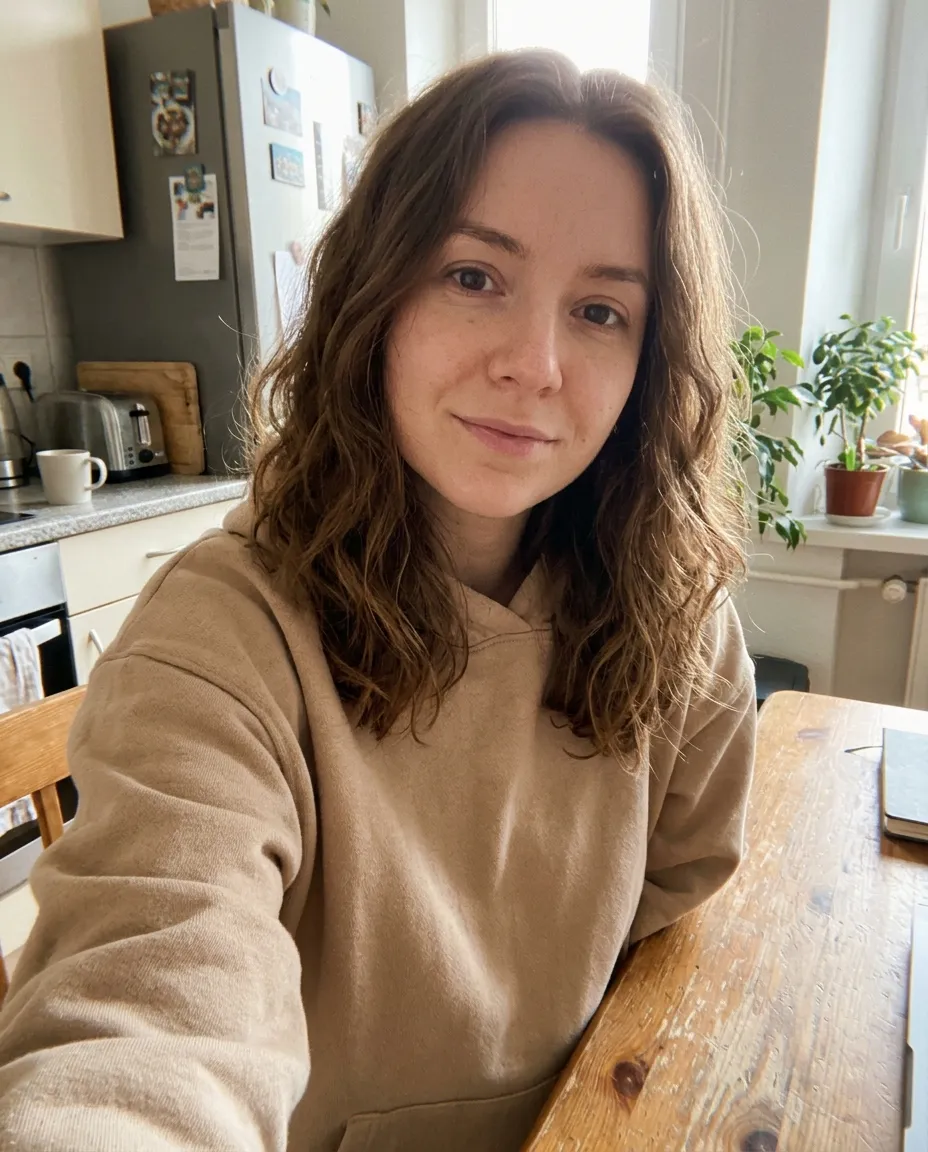
- Seedream 5.5
- Image edit
- Auto
- 1K
The same woman in the same kitchen, now wearing a forest-green knit sweater and round tortoiseshell glasses.
What is Seedream 5.5?
Seedream 5.5 is the newest image generation and editing model from ByteDance Seed, the team behind Seedream and Seedance. ByteDance released Seedream 5.5 in November 2026, after Seedream 5.0.
ByteDance’s Seedream 5.5 page names three improvements. Edits keep unedited regions intact at the pixel level, even over several rounds. The model makes transparent and semi-transparent backgrounds natively. Light, materials and skin texture look more natural.
Seedream 5.5 takes a prompt of up to 5,000 characters and up to 10 images to edit or combine. It makes 1K or 2K PNGs in 8 aspect ratios from 9:16 to 21:9, and an edit can keep the shape of your photo.
On nano-banana.love, Seedream 5.5 runs in the browser with no API key or ByteDance account. The earlier Seedream 5.0 Pro, Lite and Flash are in the same generator.
- Max output
- 2K
- Input images
- 10
- Aspect ratios
- 8
- Credits per image, from
- 1
Seedream 5.5 by ByteDance · not affiliated with ByteDance
What you can make with Seedream 5.5
Click an image to load its prompt and settings into the generator, already set to Seedream 5.5.
Change one thing, keep the rest
Ask Seedream 5.5 for a new sweater and glasses, and only the sweater and glasses change. The face, the kitchen and the light stay as they were. Edit the result again and the untouched parts still hold.
Transparent PNGs from a prompt
Write “transparent background” in the prompt and Seedream 5.5 returns a PNG with an alpha channel. Stickers, logos, product cut-outs and characters come out ready to drop onto any design, with no background remover.
Textures that look photographed
Wool fibers, rope, wrinkles and sea spray hold up in a documentary-style shot. ByteDance tuned Seedream 5.5 for more natural light, materials and skin, so name the light and the surfaces you want.
Seedream 5.5 vs Seedream 5.0 Pro vs Nano Banana 2.1
Seedream 5.5 adds steadier edits and transparent PNGs at the lowest price of the three. Seedream 5.0 Pro is the previous Seedream quality tier. Nano Banana 2.1 goes up to 4K.
| Model | Seedream 5.5 | Seedream 5.0 Pro | Nano Banana 2.1 |
|---|---|---|---|
| Made by | ByteDance | ByteDance | |
| Top size | 2K | 2K | 4K |
| Input images | Up to 10 | Up to 10 | Up to 10 |
| Aspect ratios | 8 | 8 | 14 |
| Download | PNG | PNG | PNG |
| Price at 1K | 1 credit | 2 credits | 2 credits |
| Price at 2K | 2 credits | 4 credits | 2 credits |
| Price at 4K | — | — | 3 credits |
| Image edit price | Adds credits per photo | Same as text to image | Same as text to image |
| Best for | Precise edits and transparent PNGs | Seedream’s best quality, up to 2K | Everyday images and edits at a low price |
Not sure which to pick? See all image models
How to use Seedream 5.5
- 01
Pick a mode
Text to Image starts from a prompt. Image Edit starts from your photos, up to 10 of them. Seedream 5.5 is already selected.
- 02
Describe it
Say what you want to see or change: subject, setting, light, style and any words that should appear in the image.
- 03
Choose the shape
Pick one of 8 aspect ratios, and 1K, 2K. The price is on the Generate button.
- 04
Generate and download
Most images are ready in under a minute. Download the PNG, or change the prompt and run it again.
Seedream 5.5 pricing
Pay per image. Credit packs start at $4.90 with no subscription, credits never expire, and failed images are refunded automatically.
| Model | 1K | 2K | 3K | 4K |
|---|---|---|---|---|
| Seedream 5.5 | 1 credit | 2 credits | — | — |
| Nano Banana 2.1 | 2 credits | 2 credits | — | 3 credits |
| Nano Banana 2 | 3 credits | 4 credits | — | 5 credits |
| Nano Banana Pro | 5 credits | 5 credits | — | 7 credits |
| Nano Banana 2 Lite | 2 credits | — | — | — |
| GPT Image 2.6 Sunburst | 3 credits | 5 credits | — | 7 credits |
| GPT Image 2.6 Flare | 3 credits | 5 credits | — | 7 credits |
| GPT Image 2.6 Economy | 2 credits | — | — | — |
| GPT Image 2.5 Sunburst | 2 credits | 3 credits | — | 5 credits |
| GPT Image 2.5 Flare | 2 credits | 3 credits | — | 5 credits |
| GPT Image 2 | 2 credits | 3 credits | — | 5 credits |
| Seedream 5.0 Pro | 2 credits | 4 credits | — | — |
| Seedream 5.0 Lite | — | 2 credits | 2 credits | 2 credits |
| Seedream 5.0 Flash | 1 credit | 1 credit | — | — |
| Grok Imagine Image 2.0 | 2 credits | — | — | — |
Seedream 5.5 edits cost more for each photo you upload: 2 credits at 1K or 3 at 2K with one photo, and up to 5 or 6 with 10.
GPT Image 2.6 Flare and Sunburst prices are for Medium quality. Low costs 2, 3 or 4 credits, and High costs 3, 6 or 9 credits, at 1K, 2K and 4K.
GPT Image 2.6 Flare and Sunburst edits cost more for each photo you upload at Medium quality: 3 credits at 1K, 5 at 2K or 8 at 4K with one photo, and up to 12, 14 or 17 with 16.
Seedream 5.5 FAQ
Something else? Email support@nano-banana.love.
What is Seedream 5.5?
Seedream 5.5 is ByteDance Seed’s newest image model, released in November 2026. Seedream 5.5 creates images from text and edits up to 10 uploaded photos, at 1K or 2K. Its main upgrades over Seedream 5.0 are edits that leave untouched areas unchanged, native transparent backgrounds and more natural textures.
When was Seedream 5.5 released?
ByteDance released Seedream 5.5 in November 2026, as the follow-up to Seedream 5.0 from earlier that year. Seedream 5.5 has been available in the generator on nano-banana.love since November 2026.
What is the difference between Seedream 5.5 and Seedream 5.0?
Seedream 5.5 is the newer model. Seedream 5.5 keeps unedited areas steady across several edits and makes transparent PNGs, which Seedream 5.0 does not. Seedream 5.5 makes 1K or 2K images. Seedream 5.0 Lite goes up to 4K, and Seedream 5.0 Flash is the cheapest Seedream for drafts.
Can Seedream 5.5 make images with a transparent background?
Yes. Write “transparent background” in the Seedream 5.5 prompt, for example “a sticker of a cat, transparent background outside the sticker”. Seedream 5.5 then returns a PNG with an alpha channel, so stickers, logos and product cut-outs need no separate background remover.
How much does Seedream 5.5 cost?
Seedream 5.5 text to image costs 1 credit at 1K and 2 at 2K. Seedream 5.5 edits cost more for each photo you upload: 2 credits at 1K or 3 at 2K with one photo, and up to 5 or 6 with 10. The Generate button always shows the exact price before you start. Packs start at $4.90 for 40 credits.
Can Seedream 5.5 make 4K images?
No. Seedream 5.5 makes images at 1K or 2K. For 4K, use Seedream 5.0 Lite (2 credits at any size) or Nano Banana 2.1 (2 credits at 1K, 2 at 2K and 3 at 4K). Both are in the same generator.
Seedream 5.5 vs Nano Banana 2.1: which should I use?
Use Seedream 5.5 for transparent PNGs and for photo edits that must leave the rest of the picture alone, from 1 credit. Use Nano Banana 2.1 for 4K output, very wide or tall shapes like 8:1, and prompts that lean on world knowledge. Run the same prompt on both to compare.
Is Seedream 5.5 free?
No. Every image runs on ByteDance’s model through a paid API, so generating costs credits: 1 credit at 1K and 2 at 2K. Seedream 5.5 edits cost more for each photo you upload: 2 credits at 1K or 3 at 2K with one photo, and up to 5 or 6 with 10. Packs start at $4.90 for 40 credits, enough for 40 Seedream 5.5 images, with no subscription. Credits never expire, and failed images are refunded automatically.
How do I use Seedream 5.5?
Open the generator at the top of this page, where Seedream 5.5 is already selected. Choose Text to Image or Image Edit, write a prompt (and upload photos for an edit), pick the aspect ratio and size, and press Generate. You sign in with Google; no API key or ByteDance account needed.
Can I use Seedream 5.5 images commercially?
Yes. Images you generate are yours to use in ads, product listings, client work and social posts, as long as your prompt and uploads respect other people’s rights and follow our content standards. We add no visible watermark.
Is nano-banana.love the official Seedream 5.5 website?
No. nano-banana.love is an independent website that runs Seedream 5.5 through a third-party API provider. It is not affiliated with or endorsed by ByteDance. Your images stay in “My images” for 14 days.

Make your first Seedream 5.5 image
Describe it or upload a photo to edit, and download a PNG, with a transparent background if you ask for one.
Start creating